How to Write an Effective Software Design Document
A good design doc can save you years of development time. Writing a design doc forces you to think through important decisions before you waste time on the wrong implementation. It’s also the best way to coordinate design decisions among teammates and partner teams.
I’ve written design docs as a developer at Google, Microsoft, and within my own companies. The specifics vary, but the underlying principles remain the same. A design doc articulates the hard problems you’re solving and helps your teammates give you feedback.
Below, I share my approach to creating effective design docs and explain what belongs in a design doc and what does not.
- An example design doc
- When should you write a design doc?
- How much should you invest into your design doc?
- What belongs in a design doc?
- Components of a design doc
- Driving Your Design Doc through Review
An example design doc🔗
The most common question I get about design docs is where to find a good one. I’ve never seen a public design doc that I consider high-quality. All of mine are hidden away at the companies that paid me to write them.
So, I wrote a design doc from scratch based on the principles I’m sharing here. It lays out the design for a real web app I’m building.
I created the design doc before writing any code, and I’m adhering to the design as I implement the app.
The design is more exhaustive than what I’d normally write for a solo hobby project, but this is roughly the length and depth of a design doc I’d create if I were coordinating work with other people on a professional project.
When should you write a design doc?🔗
The more complex or risky the project, the more valuable it is to write a design doc.
Consider these questions:
- Will multiple people coordinate work to implement the design?
- Will the project take more than three months of full-time dev work?
- Will the implementation run in production for several years?
- Does the project involve cross-team collaboration?
- Are the goals and requirements of the project ambiguous?
- Are there catastrophic risks you could prevent at design time (e.g., security flaws, legal risks)?
If you answered “yes” to any of these questions, then it’s likely worth the effort to write a design doc. If you answered “yes” to two or more, a design doc will almost certainly be worth the effort.
How much should you invest into your design doc?🔗
A design doc can be a simple one-pager or a 50-page document that requires signoff from five different teams. You need to decide how much detail makes sense.
There’s no universal rule that says how long you should spend on a design doc just like there’s no rule that says how much to test your code. The right investment depends on your team’s goals, risks, deadlines, and culture. Sometimes, the right amount to invest in a design doc is zero.
What belongs in a design doc?🔗
If you specify every possible detail in a design doc, you’ve essentially written the implementation during the design phase. That would defeat the whole purpose of a design doc.
As a rule of thumb, you can ask a simple question to decide whether a decision belongs in your design doc: what’s the penalty for being wrong?
What’s the cost of getting it wrong?🔗
Not all design decisions are equally important. Some choices are more permanent than others.
For example, if you build a web application in C++ and realize 200k lines later that Ruby on Rails was the better choice, you’re stuck. A from-scratch rewrite would never work, and even if you manage to write new code in Rails, you’re still maintaining code in two wildly different languages.
Other design decisions are trivial. For example, if your app displays a list of 100 articles, should they all appear at once? Or should the user see 25 at a time and click “Load more” to see the next 25?
It doesn’t matter.
A “load more” button is not a design-level concern. If you pick one solution, and user feedback tells you you’re wrong, you can fix it in a few hours. You don’t need to detail your entire thought process in your design doc, and you definitely shouldn’t waste review cycles arguing about it.
Components of a design doc🔗
Below, I’ve included common sections to include in your design docs. You generally don’t need every single section for every doc. Choose the subset that make sense for you.
Title🔗
The first thing your project needs is a title. It’s the way people will refer to your project in conversation, so aim for something short, distinctive, and evocative.
For example, if you were adding a caching layer between your application server and your database server, RecencyBank would be a good name. It’s easy to say and describes your project’s purpose. A bad name would be “Project Flying Silver Horse” because it’s verbose and nonsensical.
Metadata🔗
Boring but useful, metadata helps your reader understand the basic context of your doc:
- Who is the author? (name + email address)
- When did you create the doc?
- What’s the authoritative URL?
- Especially if your organization uses shortlink redirects like
http://go/recency-bank
- Especially if your organization uses shortlink redirects like
- Who approved this document and when?
- In cases where your document requires signoff from teammates or partners.
Metadata
- URL: http://go/recency-bank-design
- Author: Michael Lynch (michael@refactoringenglish.com)
- Created: 2026-06-22
- Status: Approved
- alan@ signed off, 2026-07-14
- betty@ signed off, 2026-07-15
Objective🔗
The objective is a one-sentence explanation of your project’s purpose. It should appear on the first page of your doc in plain language that any stakeholder understands.
Objective
Improve application performance by adding a caching layer between the Trogdor web server and the Postgres database.
Background🔗
The background section explains the context and motivation for the project. It should answer these questions:
- Why is the team taking on this project?
- What problem does this project solve?
- Were there previous attempts to solve this problem?
Background
When we launched the Trogdor web app in 2023, pages typically loaded in 100ms or less. After three years, median page loads have ballooned to 600ms, which causes users to perceive our app as sluggish.
We investigated the slowdown and discovered that database lookups make up 80% of page load times. As our data store has grown larger, database lookups have gotten slower.
We also discovered that 95% of database lookups are for the same 3% of database rows. This pattern of usage benefits greatly from memory-backed caching. The cache would serve frequently-accessed data faster and reduce database load for all other queries.
Does your design doc make sense without outside context?
Imagine what you’d say to a teammate or partner team before they read your design doc.
Now, realize that some readers will see the doc before hearing any explanation from you, so whatever they need to understand should be on the first page of your doc.
Related documents🔗
If this project connects to other documents, make it easy for the reader to find them.
Include links to:
- Documents from your program manager or testing counterparts on this project (e.g., test plans, functional specs)
- Design docs for related systems
- Design docs for previous iterations of this project
Related documents
- Testing plan: http://go/recency-bank-test-plan
- Trogdor performance report: http://go/trogdor-perf-2026
Goals🔗
The goals section describes your high-level goals for this project. It should connect logically to the background section and explain what the world looks like after you’ve completed implementation.
Avoid setting goals in terms of implementation details. Your goals should communicate how the project benefits your users, your team, or your company.
- Add Kubernetes to our infrastructure.
- Minimize outages related to deploying new app versions.
Goals
- Increase user-perceived responsiveness for Trogdor web app.
- Reduce database server load.
Non-goals🔗
While the goals define what’s within your project’s scope, the non-goals section delineates what’s out of scope.
Are there goals that readers might mistakenly assume are within scope for your project? If so, add them as explicit non-goals.
Non-goals
- Create a general-purpose, reusable caching system
- The caching layer we add to the Trogdor web app will make application-specific optimizations. Re-using this cache on other systems is out of scope.
- Location-aware caching
- It may be useful in the future to support caches that sit geographically close to the end user to reduce latency, but that is out of scope of v1.
Scenarios🔗
If your goal is something like “Add a ‘Share as URL’ button to charts,” the reader might not understand what that looks like in practice.
The scenarios section allows you to paint a picture for your reader of how your completed system works in the real world.
Scenario: Share a report via URL
- Bob creates a custom report in his KeyMetrics dashboard.
- Bob navigates to the menu bar and clicks “Share > as URL.”
- Bob emails the URL to his teammate, Charlie.
- Charlie clicks the link and sees an exact copy of Bob’s report in read-only mode.
Diagrams🔗
Diagrams are tremendously valuable, though they might not seem that way.
As the design author, you intuitively understand how the pieces of your plan fit together. You can see the architecture in your head. Your reviewers do not have this mental picture, so the fastest way for them to see it is to draw them a picture.
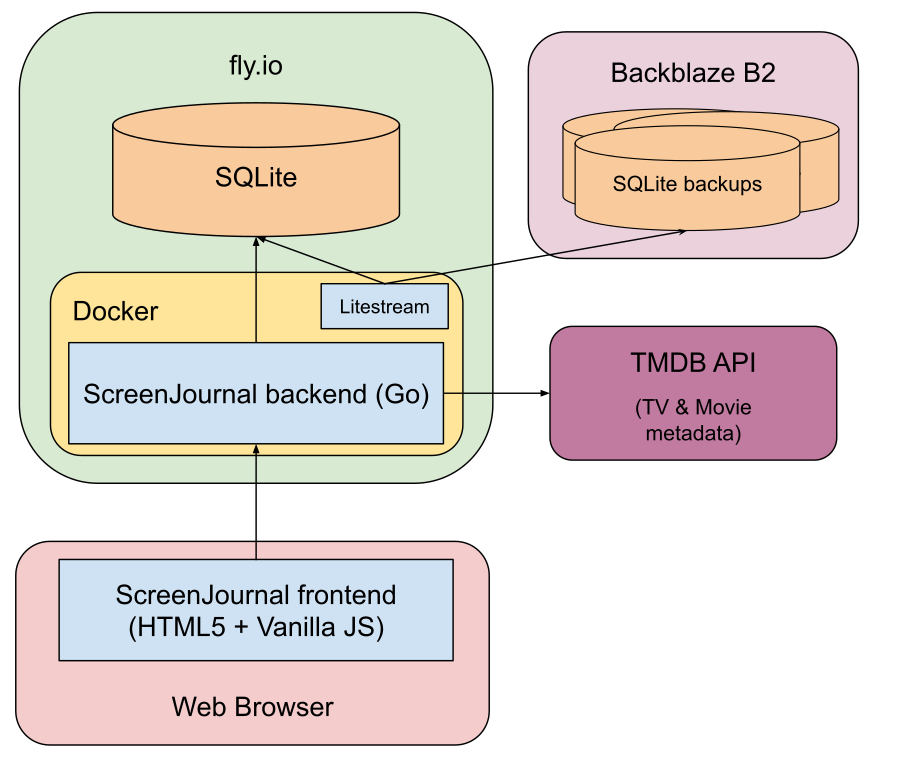
Example diagram showing the architecture of a simple web application.
If you’re not sure what belongs in a diagram, think about these questions:
- How does data flow through your system?
- How do the different components of your system fit together?
- How does your system interact with its dependencies and downstream clients?
- What communication protocols does your system define?
Choose a diagramming tool that’s flexible to editing. I’ve seen developers create a beautiful diagram on a whiteboard and photograph it for their design doc. The first draft looks amazing, but then they’re stuck with that diagram forever because they can’t edit the photo without recreating the whole thing from scratch.
Excalidraw, draw.io, and Google Drawings are popular diagramming tools that facilitate revisions. There are also languages like Mermaid, D2, and Graphviz that allow you to generate diagrams programmatically. I’ve had good experience using an LLM to create diagramming code for me. Remember to link to the source drawing or code so that your teammates have a way to reproduce the diagram as well.
Glossary🔗
The glossary defines terms that your readers might not recognize.
Think hard about the potential readers of your doc, especially newer team members and people outside of your immediate team. Will those readers understand the names of internal tools or systems your doc references?
When possible, use terms that your audience recognizes without having to refer to a glossary. Defining a term in a glossary is better than not defining it at all, but the best solution is to use recognizable terms or define them inline so that the reader doesn’t have to jump around your document.
Glossary
- Apposaurus: the team’s internal load testing tool. We use Apposaurus to simulate a surge of visitors to the Trogdor web app so we can verify the app continues functioning under expected workloads.
- Baba-o-styley: an internal code linter that enforces the company’s code style conventions.
Constraints🔗
If there are major constraints imposed on your design by your budget, clients, infrastructure, or dependencies, explain the constraints so the reader understands the context of your design choices.
Constraints
Our servers are all RISC-V, so all code and dependencies must run on RISC-V architecture.
Service level objectives (SLOs)🔗
An SLO creates a measurable, objective metric for your system’s performance. You’ve probably heard of service level agreements (SLAs). SLAs are just SLOs plus financial penalties for falling short.
Within a company, you typically don’t financially penalize your co-workers for mistakes (although, wouldn’t that be kind of fun?). So, design docs define SLOs rather than SLAs.
Your manager might tell you that your app must be “performant on mobile,” but that’s vague. Your manager’s idea of “performant” might be <2ms of latency, and you don’t want to wait until code complete to find out. A well-defined SLO prevents ambiguity by expressing goals in concrete, objective terms.
The typical considerations for your SLO are:
- Uptime / availability: What percentage of time will your system be available?
- Latency: How quickly will your service complete requests?
- Scale: What volume of work can your system handle?
Service level objectives
- Trogdor’s 50th percentile latency for user-facing HTTP requests: <=200ms
- Postgres 50th percentile query latency: <= 80ms
Monitoring / alerting🔗
Once you nail down your SLOs (above), it’s time to think about how you’ll measure them in production.
The simplest way to verify that you’ve achieved your SLOs is to test manually. As your organization matures, you should automate monitoring to discover SLO failures immediately.
When defining your monitoring strategy, ask yourself these questions:
- If your service goes down, how will you find out?
- If your service’s performance slows by 100x, how will you know?
- What other events should trigger an alert?
- e.g., spikes in CPU usage, authentication failures, system errors
Monitoring
The following events will trigger a page to the on-call engineer:
- Trogdor’s 95th percentile latency for user-facing HTTP requests: >= 3s
- Average CPU usage for Postgres servers during trailing 2m window: >= 90%
Timeline🔗
The timeline section breaks your project into milestones. It specifies when you’ll deliver results to project stakeholders.
Choose milestones that create useful artifacts for stakeholders. For example, start with a UI that shows dummy data, and show that to clients first. If it turns out you misunderstood the client’s requirements, fake data lets you find out early rather than after you’ve already implemented all the plumbing to populate the UI with production data.
If you don’t know how to estimate project timelines, I highly recommend Joel Spolsky’s “Painless Software Schedules.” The article is 25 years old, but it remains my favorite software estimation strategy.
Timeline
- Milestone 1 (2026-07-01): RecencyBank is live in the test environment with a hardcoded subset of cached data (doesn’t read from Postgres).
- Milestone 2 (2026-07-17): RecencyBank is live in the test environment and caches real data from Postgres.
- Milestone 3 (2026-08-03): RecencyBank is live in the test environment and enforces cache eviction and lifecycle rules.
- Milestone 4 (2026-08-22): RecencyBank is fully implemented and deployed to production.
Interfaces🔗
Your project exists to serve people or other software systems, so what do those interactions look like?
- For graphical systems, what is the user interface?
- Just simple sketches; don’t get bogged down in precise UI choices.
- For software interfaces, what are the API or CLI semantics?
- For file-based interfaces, what is the file format?
Interfaces
The Trogdor
Serverstruct currently depends directly on aPostgresDBGostructlike this:type Server struct { db PostgresDB }
PostgresDBhas the following exported methods:GetUser(id UserID) (User, error) ListUsers() ([]User, error) ...We will create a Go
interfacetype with the same API surface asPostgresDB:type Store interface { GetUser(id UserID) (User, error) ListUsers() ([]User, error) }We will implement a RecencyBank caching type that implements the same
interfaceand wraps the backendPostgresDBstruct. The RecencyBank implementation will cache reads from Postgres and forward requests to Postgres when they mutate state or depend on data not in the cache.The only change to the
Serverimplementation will be replacing the type of one member with the newinterface:type Server struct { db store.Store }
Dependencies / infrastructure🔗
The dependencies section should answer questions like:
- What programming language(s) will you use?
- On what hardware or service does the code run?
- Where will persistent data live?
It’s easy to overlook this section, but decisions about language, libraries, and infrastructure have a major impact on the complexity and long-term maintenance costs of your system.
Think deeply about which dependencies will be difficult to change after implementation. Don’t worry so much about the ones that swap out easily. It’s difficult to change languages or storage backends, but if you’re dissatisfied with the third-party service you use to send emails, you can replace it in an afternoon.
Dependencies
- Language: Go
- We widely use Go already, and it’s a suitable language for serving highly parallel workflows.
- Third-party packages
- bbolt: This is a widely used key-value store implementation that implements many of the features we need for RecencyBank.
Security🔗
To build secure software, developers must integrate security into the full software lifecycle, starting at the design stage.
The security section should answer questions like:
- What threats did you consider?
- e.g., what happens if an attacker tries every possible password? What if a user uploads a PDF infected with malware?
- What is the attack surface of this system?
- i.e., where does it process potentially malicious data?
- What are the trust boundaries?
- At what point does data flow from a less privileged system to a more privileged system?
- e.g., in a web app, requests from the user’s browser cross a trust boundary, as the web server shouldn’t assume input from the browser is safe.
Even if you think security threats are unlikely or irrelevant in your system, it’s still helpful to document your rationale. Your explanation might prompt reviewers to identify threats you overlooked.
Security
RecencyBank must not accept direct requests from the public Internet, as it does not enforce any access control.
RecencyBank will run on a segregated network where it only accepts inbound requests from the Trogdor web server and can only make outbound requests to the Postgres server pool.
Privacy🔗
The privacy section is an opportunity to think through the sensitive data your system handles and what safeguards you’ll put in place to keep it secure. It should answer these questions:
- What sensitive data does your system handle?
- How long will you retain it?
- Who will have access to it?
- How will you protect it?
- e.g., will the data be encrypted at rest and in transit?
Privacy
RecencyBank contains the same sensitive user data as the Postgres database, so it inherits the privacy policy of our Postgres systems. In particular, engineers may only access RecencyBank systems in production with an associated bug number. Engineers must minimize the user data they access to only what is strictly required to investigate a bug.
Legal considerations🔗
If your system operates in a highly-regulated domain like finance or healthcare, the legal section helps you comply with relevant laws.
Even outside of regulated domains, think about whether your system could break the law if things go awry. Explain how you’ll steer clear of legal violations that could put your company or clients at risk.
If you’re publishing your code under an open-source license, define which license you’ve chosen and why.
FizzleCorp contractual compliance
Our contract with FizzleCorp strictly limits our ability to create new copies of their proprietary FizzlePerfect™ user biometrics.
Fortunately, our legal team reviewed the wording of the contract and confirmed that a caching layer fits within the existing definition of “storage layer,” so we may cache FizzlePerfect™ data within RecencyBank without contract renegotiation.
Logging🔗
Logs can be tremendously valuable when you’re investigating a bug, performance issue, or security incident. If you design for effective logging, you’ll make it easier to maintain your system long-term.
As you think about logging, consider these questions:
- What critical events does the service log?
- Are there different log levels?
- e.g., informational, warning, error, critical
- Where does the system store its logs?
- How long do you retain your logs?
- Who has access to the logs?
- Is there any sensitive data you must keep out of the logs?
Logging
RecencyBank logs the following events:
- At initialization, logs the parameters used to initialize RecencyBank as well as RAM capacity and usage on the host.
- Persisting a value in memory fails.
- Invalidating the cache fails.
Open issues🔗
As you write your design doc, you’ll likely encounter at least one of the following situations:
- There’s a flaw in your design, but you’re not sure how to solve it.
- There’s a gap in your design, but you need to gather more information to close it.
- You’re torn between multiple solutions.
Create an appendix in your design doc called “Open Issues” that documents your outstanding issues.
Each entry in the open issues section should explain:
- What’s the problem that requires more work?
- What options do you see for resolving the issue?
- What is the immediate next step for resolving the issue?
See my companion post for details about how to manage open issues during the review phase.
Open Issue: Choosing RAM size for cache
We need to decide how much RAM to assign to our caching layer. Adding RAM increases performance, but RAM is expensive, and there are diminishing returns to extra RAM.
There is some optimal amount of RAM that minimizes our infrastructure costs between the caching system and our database. We could theoretically discover that optimal value by setting up a test environment and running several simulations, but running those simulations costs us dev time.
I estimate the cost of creating a test environment and running a single simulation to be 3.0 dev days. Once the infrastructure is in place, additional simulations will take about 0.75 dev days each.
Proposed solution: Choose 128 GB of RAM without testing. It’s probably close to optimal, and dev time is significantly more expensive than RAM.
Next step: Ask our tech lead to weigh in.
Resolved issues🔗
When you resolve an open issue, summarize the decision, and move it from “Open issues” to a “Resolved issues” section in your design doc. Retain the full discussion for posterity.
Resolved Issue: Choosing RAM size for cache
Decision: Provision 128 GB of RAM to the caching layer. If we’re failing to meet our performance goals and we’re RAM-constrained, we can add more RAM at that point. The dev cost of running tests to discover the perfect RAM size far outweighs the cost of additional RAM.
We need to decide… [rest of original open issue goes here]
Alternatives considered🔗
If you anticipate readers asking, “Why didn’t you do X?” it’s helpful to answer that proactively in an “alternatives considered” section. This section is also where you can explain options you rejected, especially if they initially seemed appealing or you researched them extensively.
I know some developers who spend hours meticulously documenting their every rejected design idea, but I think that’s overkill. As both a reader and author, all I need in the alternatives section is a few brief lines describing strong alternatives and why they didn’t work.
Alternatives Considered
- Google Cloud Firestore (persistent storage)
- The durability and reliability were appealing, but I disliked the platform lock-in and the difficulty of testing locally.
Driving Your Design Doc through Review🔗
Once you’ve completed your design doc, the next step is to share it with your team and gather feedback.
The following section covers techniques for eliciting useful design feedback that moves your project forward rather than stalling it with bickering and confusion: